
First thoughts on the BlackBerry Pearl
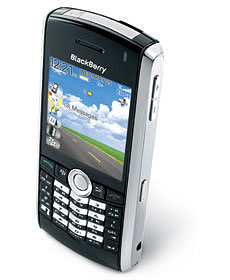
I’ve always been adverse to getting a BlackBerry for a few of reasons:
- I don’t get away from work much as it is so I felt having emails on my BlackBerry on the go all the time would be one step too far.
- The size of the BlackBerry –they’re ridiculous, I like my phone to be as small as possible so it interferes with my life as little as possible.
- I’ve heard horror stories about the increase in bandwidths to manage the email push.
Then while we were looking at new contracts over Christmas Stacey picked up the BlackBerry Pearl which was small and sleek and suggested I gave it a go. As she didn’t want to change from her V3 we agreed I’d give it a go for a month and if I didn’t like it I’d have her free upgrade (a Sony Ericsson w810i).
I’ve had the BlackBerry Pearl for well over a month now so I thought I’d share my findings in case anyone else is thinking of getting one.
How does the BlackBerry “work”?
There are plenty of tutorials for the BlackBerry and far more advanced information on how the BlackBerry actually works but I thought it may be worth over viewing how it’s configured and the basic concepts.
BlackBerrys use something called “Push” Technology to retrieve emails, your email client (Outlook, Eudora, Thunderbird etc) classically collects email from a server by contacting the server and getting a list of emails and then downloading the emails. BlackBerrys on the other hand have the email sent to it from the server.
When you first get your BlackBerry you have to configure your email accounts with your BlackBerry’s ISP (in my case O2), you supply them with server details for your mail account (POP3 settings). Your ISP will then periodically check your email account and collect the new email messages which are then encrypted and sent (or pushed) to your BlackBerry (in a similar way to an SMS message). The BlackBerry then decrypts the email and allows you to read it. Simple eh :)
My thoughts on the BlackBerry Pearl
Things I like about the BlackBerry Pearl:
- It’s size –it’s no larger than a lot of the other phones out there at the moment, in fact it’s smaller than my old Motorola V3 while it was closed (though it’s about 5mm longer)
- It’s synchronisation with Outlook. I used to have a Palm LifeDrive to manage my calander, address book and tasks etc and a separate address book on my V3 which didn’t sync correctly with Outlook so the three were nearly always different –that and I hated having to carry around the LifeDrive as it was just extra bulk... The BlackBerry Pearl however seamlessly manages it all which has meant that I’ve started managing my to-do list a lot more efficiently as well as my address book.
- The size and clarity of the screen.
- Today Plus theme –an extra download but well worth it as it summarises all the info you need to know at a glance on the home screen.
- Battery life –quoted at around 8½ hours talk time I’m certainly getting at least this. A lot of the time I plug it in via USB while I’m working which charges it but I’ve had a couple of weekends away recently which has meant it’s not got charged and it happily coped with the (for me) heavy use without an issue.
- The complete call log of all incoming and out going calls on a user basis –this is great for me if I need to know how long I spent speaking to a client etc (I tend to use my mobile for most outgoing calls as they’re all free ;)).
- The degree of customisation (though this is also a downside as it is somewhat complicated).
- The fact you can customise what the side buttons do.
- The standby button –why it has a keylock I don’t know as it gets in the way of the standby button.
- The voice dialler –that’s awesome.
- VoiceRecorder+ (a voice memo recorder for the BlackBerry Pearl from ShapeServices – www.shapeservices.com)
- The fact you can add delays into the number dialling to quickly and automatically navigate the IVR options for systems you regularly use.
Things I dislike about the BlackBerry Pearl:
- It’s pretty complicated. Unlike most phones these days each application has it’s own settings and finding where they are is sometimes a real PITA.
- You can’t set ringing profiles to activate at certain times of the day.
- You can’t send SMS messages from it through your computer.
- It doesn’t ring and vibrate at the same time.
- The ringer is a little quiet at times (though people suggest drilling holes in the back of the casing sorts this).
- The key lock which sometimes gets in the way of taking the phone out of standby –I expect there’s a way of turning it off but I’ve not found it yet.
All in all I think the BlackBerry Pearl is a superb phone and I’ll certainly be keeping it. I’ve setup a filter to ensure I don’t get spam coming through on it but I still get between 10 and 50 emails a day on it, the data transfer is still low (it’s still under 100KB) but I don’t surf the web etc.
O2 offer a deal at the moment where you can have unlimited data for £10pm on top of your bill, my thinking is if I start to use more than £10 of data a month I’ll upgrade but atm it’s all good. In regards the additional load on our mail server I’ve not noticed anything significant but I’ll analyse this in a couple of months as the calls should be clear. To avoid spam emails I’ve setup a separate mail account that the O2 server collects from, then from my main email accounts I forward any that are sent directly to me and without my spam filter’s headers added to my GMail account which then filters pretty much everything else missed by my server’s filter before forwarding it onto my BlackBerry account. I realise this is a slightly long winded method of managing it but it has meant that 99.9% of all spam has been ignored. There have been a couple of emails missed (i.e. where I’ve been CC’d) but I can live without having those on the go ;)
I had an issue when I first got the BlackBerry Pearl that all numbers would be dialled with the prefix of +44 and the leading 0. As it happens, the fix is pretty simple:
- Open the call log
- Press the menu key (the BlackBerry icon)
- Choose “General Options”
- Choose “Smart Dialing”
- Change the country code to +44
Liked this post? Got a suggestion? Leave a comment