Tim

Footprints in the snow of a warped mind

Clean out unused media items from Umbraco media folder

Where to find me

Flickr Icon  Twitter Icon  Linked In Icon  FaceBook Icon  Windows Live Alerts Butterfly  RSS 2.0 

FreeAgent Small Business Online Accounting
Business Protection by Crisis Cover

Tag Cloud

AJAX (4) Analysis (3) ASP (6) ASP.Net (59) Error Reporting (4) Web Service (2) WSDL (1) Atlas (2) Azure (1) Born In The Barn (1) Business (89) Business Start-up Advice (32) Client (17) Expanding Your Business (23) Recruitment (1) C# (22) Canoeing (4) Canoe Racing (5) Cheshire Ring Race (5) Racing (2) Training (4) CIMA (1) Cisco (1) 7970G (1) CMS (1) Code Management (1) Cohorts (4) Commerce4Umbraco (1) Content (1) Content Management (1) Content Management System (1) CSS (4) dasBlog (5) DDD (2) DDDSW (1) Design (11) Icons (1) Development (26) Domain Names (1) eCommerce (12) Employment (2) General (39) Christmas (6) Fun and Games (11) Internet (22) Random (46) RX-8 (8) Git (1) Google (1) Google AdWords (1) Google Analytics (1) Hacking (1) Helpful Script (3) Home Cinema (2) Hosting (2) HTML (3) IIS (11) iPhone (1) JavaScript (5) jQuery (2) Marketing (6) Email (1) Multipack (1) MVC (1) Networking (3) Nintendo (1) Nuget (1) OS Commerce (1) Payment (1) Photography (1) PHP (1) Plugin (1) PowerShell (3) Presentation (1) Press Release (1) Productivity (3) Random Thought (1) Script (2) Security (2) SEO (6) Server Maintenance (7) Server Management (12) Social Media (2) Social Networking (3) Experiment (1) Software (11) Office (5) Visual Studio (14) Windows (5) Vista (1) Source Control (1) SQL (9) SQL Server (19) Statistics (2) Stored Procedure (1) Sublime Text 2 (1) SVN (1) TeaCommerce (1) Testing (2) The Cloud (1) The Site Doctor (136) Turnover Challenge (1) Twitter (3) uCommerce (13) Umbraco (31) 2009 (1) 2011 (1) Useful Script (2) Virtual Machine (1) Web Development (71) WebDD (33) Wii (1) Windows Azure (1) XSLT (1)

Blog Archive

Search

<September 2008>
SunMonTueWedThuFriSat
31123456
78910111213
14151617181920
21222324252627
2829301234
567891011

Recent Comments

Blog Archive

Various Links

Google+

Blogs I Read

[Feed] Google Blog
Official Google Webmaster Central Blog
[Feed] Matt Cutts
Gadgets, Google, and SEO
[Feed] Ol' Deano's Blog
My mate Dean's blog on my space, equally as random as mine but not off on as much of a tangent!
[Feed] Sam's Blog
Sam is one of my younger brothers studying Product Design and Manufacture at Loughborough, this is his blog :) Enjoy!

Disclaimer
The opinions expressed herein are my own personal opinions and do not represent my employer's view in any way.

newtelligence dasBlog 2.2.8279.16125

Send mail to the author(s) Email Me (Tim Gaunt)

© 2013 Tim Gaunt.

Sign In

# Wednesday, September 03, 2008

Clean out unused media items from Umbraco media folder

Wednesday, September 03, 2008 5:15:14 PM (GMT Daylight Time, UTC+01:00)

When uploading some new media items for a client today we noticed that if you selected "Remove" before saving, it doesn't actually remove the file from the FileSystem. Having a quick look around the forums I saw there are a few posts already pointing this out so I thought I'd fix it.

This is a little application that simply checks the media items in the database and then compares it against a folder you select on your machine. If the file is in use according to the database then it's ignored otherwise it will remove it.
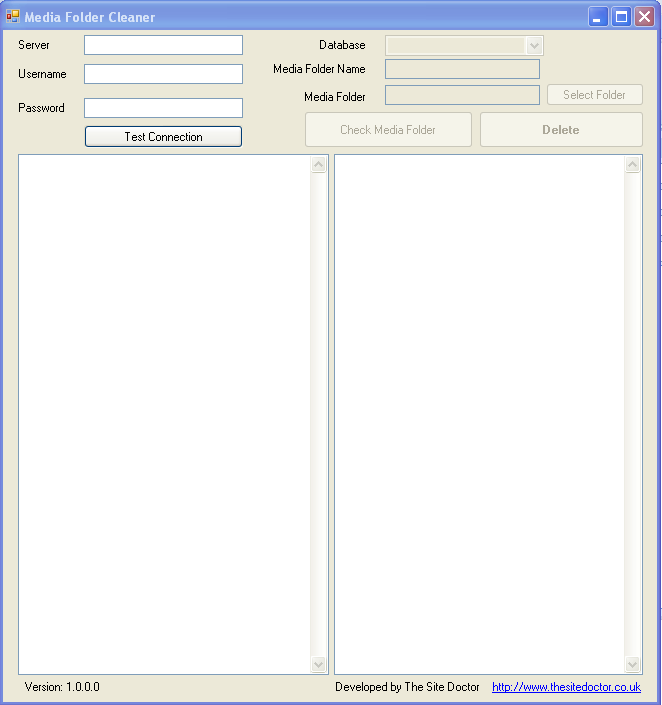
To use:

  1. Enter your server's login details
  2. Click "Test Connection"
  3. Select the relevant database from the drop down
  4. Check the "Media Folder Name" matches your Umbraco's installation
  5. Locate your Media Folder on your computer
  6. Click "Check Media Folder" -this will then list all the orphan files
  7. If it looks right, click "Delete" -with caution
  8. Job done

There are a few checks in place to avoid mishap but it's not 100% foolproof as I needed something rough and ready to sort a couple of installations out. If this is something that's seen as useful I'll extend it a touch, some ideas I've got already:

  • Check that the selected media folder matches that of the database
  • Check that the media id's are the same (to avoid wiping another installation)
  • Save config settings for easy re-use
  • Use webservices rather than a direct connection to the database
  • Enable FTP useage

Please note: I accept no responsibility if anything was to go horribly wrong with this. I would backup your folder first just in case!

You can download the MediaFolderCleaner application here


Don't forget to follow me on Twitter.